> ## Documentation Index
> Fetch the complete documentation index at: https://docs.trunk.io/llms.txt
> Use this file to discover all available pages before exploring further.
# Configure how Dynamic CI schedules each CI job
> Tune Dynamic CI per job in the Trunk web app: set schedules for pull requests and the merge queue, and add path filters that feed the scoring engine.
Dynamic CI is configured job by job on the [Configuration tab](https://app.trunk.io/ci/dynamic-ci?tab=configuration) in the Trunk web app. Each job has a schedule that controls how it is evaluated on pull requests and in the merge queue, plus optional path filters that tell Dynamic CI which changes are relevant to it.
## Find a job
The Configuration tab lists every job managed by Dynamic CI across your repositories. Use the filters at the top to narrow the list:
* **Repositories**: show jobs from one repository or all of them.
* **Workflows**: show jobs from a specific workflow file, such as `pr.yaml`.
* **Search jobs**: find a job by its name or ID.
Each row shows the job's workflow, a summary of what it does, its typical runtime, and its current schedule.
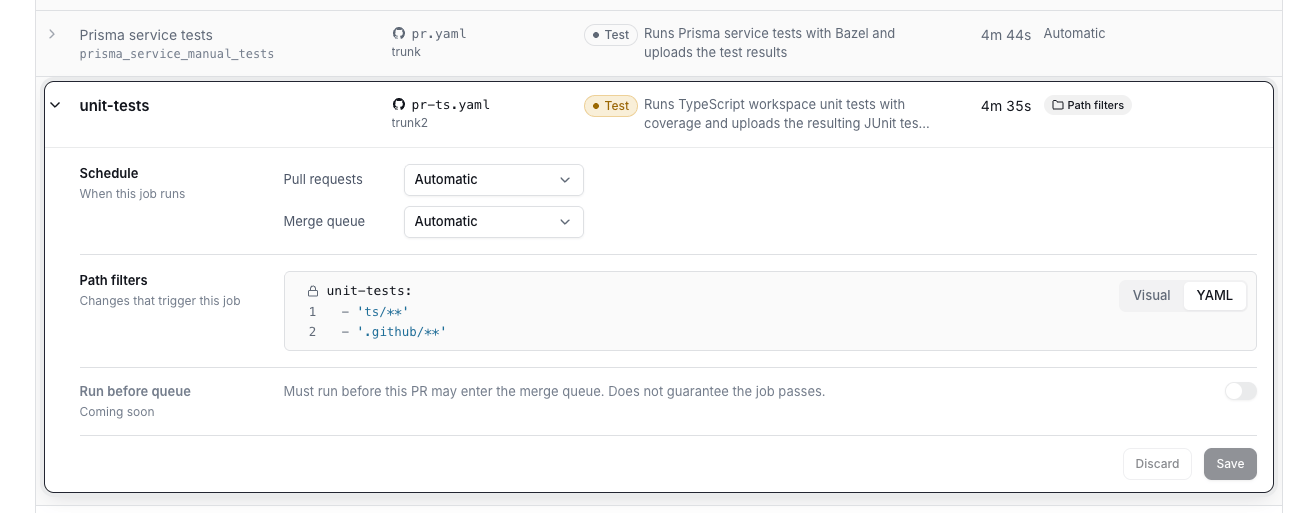
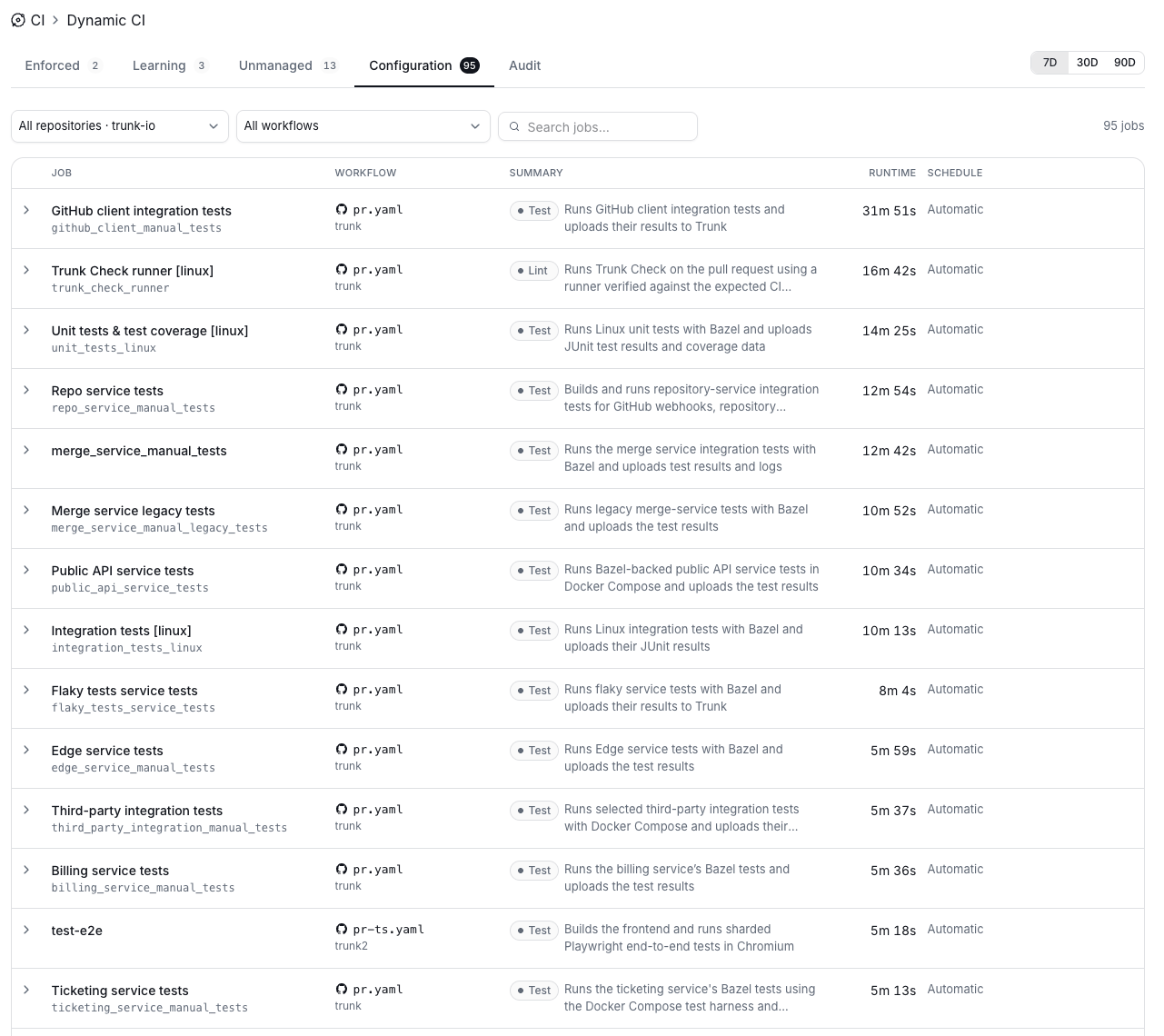 Click a job to expand its settings. After making changes, click **Save** to apply them or **Discard** to revert.
 ## Schedule
The schedule controls how Dynamic CI evaluates a job. You set it separately for **Pull requests** and the **Merge queue**.
| Schedule | Behavior |
| - | - |
| **Automatic** | Defers to the Dynamic CI scoring engine, which decides push by push whether the job runs or is skipped. |
| **Always Run** | The job runs every time, regardless of the scoring engine. |
| **Always Skip** | The job is always skipped. |
In the merge queue, **Automatic** runs every job by default to guarantee correctness. The merge queue is the final safeguard against regressions, so Dynamic CI does not skip jobs there on its own.
## Path filters
Path filters describe which changed files are relevant to a job. They use the same glob syntax as [dorny/paths-filter](https://github.com/dorny/paths-filter): the job's name followed by a list of patterns.
```yaml theme={"system"}
unit-tests:
- 'ts/**'
- '.github/**'
```
You can edit filters in the **Visual** editor or switch to **YAML**.
By default, path filters are another signal into the scoring engine rather than a hard rule. A change that matches a job's filters makes the engine more likely to run it, and a change that touches none of them makes a skip more likely, but the engine still weighs the job's history and the pull request's state before deciding.
Jobs with path filters show a **Path filters** badge in the job list.
## Run before queue
Coming soon. When enabled, the job must run before the pull request can enter the merge queue. This guarantees the job runs, not that it passes.
## Related
Override Dynamic CI on a single pull request.
How Dynamic CI behaves on merge queue runs.
## Schedule
The schedule controls how Dynamic CI evaluates a job. You set it separately for **Pull requests** and the **Merge queue**.
| Schedule | Behavior |
| - | - |
| **Automatic** | Defers to the Dynamic CI scoring engine, which decides push by push whether the job runs or is skipped. |
| **Always Run** | The job runs every time, regardless of the scoring engine. |
| **Always Skip** | The job is always skipped. |
In the merge queue, **Automatic** runs every job by default to guarantee correctness. The merge queue is the final safeguard against regressions, so Dynamic CI does not skip jobs there on its own.
## Path filters
Path filters describe which changed files are relevant to a job. They use the same glob syntax as [dorny/paths-filter](https://github.com/dorny/paths-filter): the job's name followed by a list of patterns.
```yaml theme={"system"}
unit-tests:
- 'ts/**'
- '.github/**'
```
You can edit filters in the **Visual** editor or switch to **YAML**.
By default, path filters are another signal into the scoring engine rather than a hard rule. A change that matches a job's filters makes the engine more likely to run it, and a change that touches none of them makes a skip more likely, but the engine still weighs the job's history and the pull request's state before deciding.
Jobs with path filters show a **Path filters** badge in the job list.
## Run before queue
Coming soon. When enabled, the job must run before the pull request can enter the merge queue. This guarantees the job runs, not that it passes.
## Related
Override Dynamic CI on a single pull request.
How Dynamic CI behaves on merge queue runs.