> ## Documentation Index
> Fetch the complete documentation index at: https://docs.trunk.io/llms.txt
> Use this file to discover all available pages before exploring further.
# BuildKite
> Export Buildkite's OpenTelemetry traces to Trunk to collect CI data from your builds.
BuildKite emits OpenTelemetry traces natively. To setup Trunk CI we need to add Trunk's ingest endpoint to the OTEL setup in BuildKite.
There are two exports, and they are complementary:
* **The notification service**, configured once for your BuildKite organization. It reports build and job lifecycle 0 start, finish, conclusion,
queue wait. This is the one to set up first, and it is enough on its own.
* **Agent tracing**, configured on your agents. It adds execution-time detail
from inside the running build.
Both send to the same endpoint and share a trace, so a build reads as one thing
whether you run one or both.
#### Before you start
BuildKite tells Trunk nothing about which repository a build belongs to except
its **git remote**. Trunk parses `owner/name` out of that remote and looks for a
matching repository in your organization.
So the repository must already exist in Trunk and have **CI Intelligence**
toggled on - see [Getting Started](/ci/get-started). A pipeline whose remote does
not resolve to a repository Trunk knows about is skipped silently.
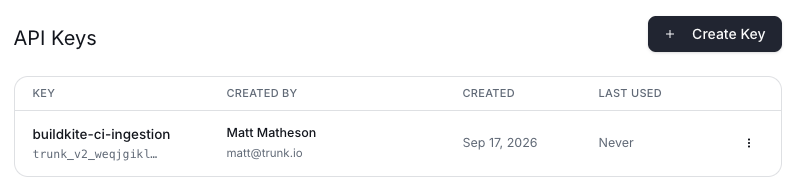
#### Create Trunk API Key for the Uploads
In the Trunk app, navigate to [app.trunk.io/settings/developer/api-tokens](https://app.trunk.io/settings/developer/api-tokens).
 #### Configure the notification service
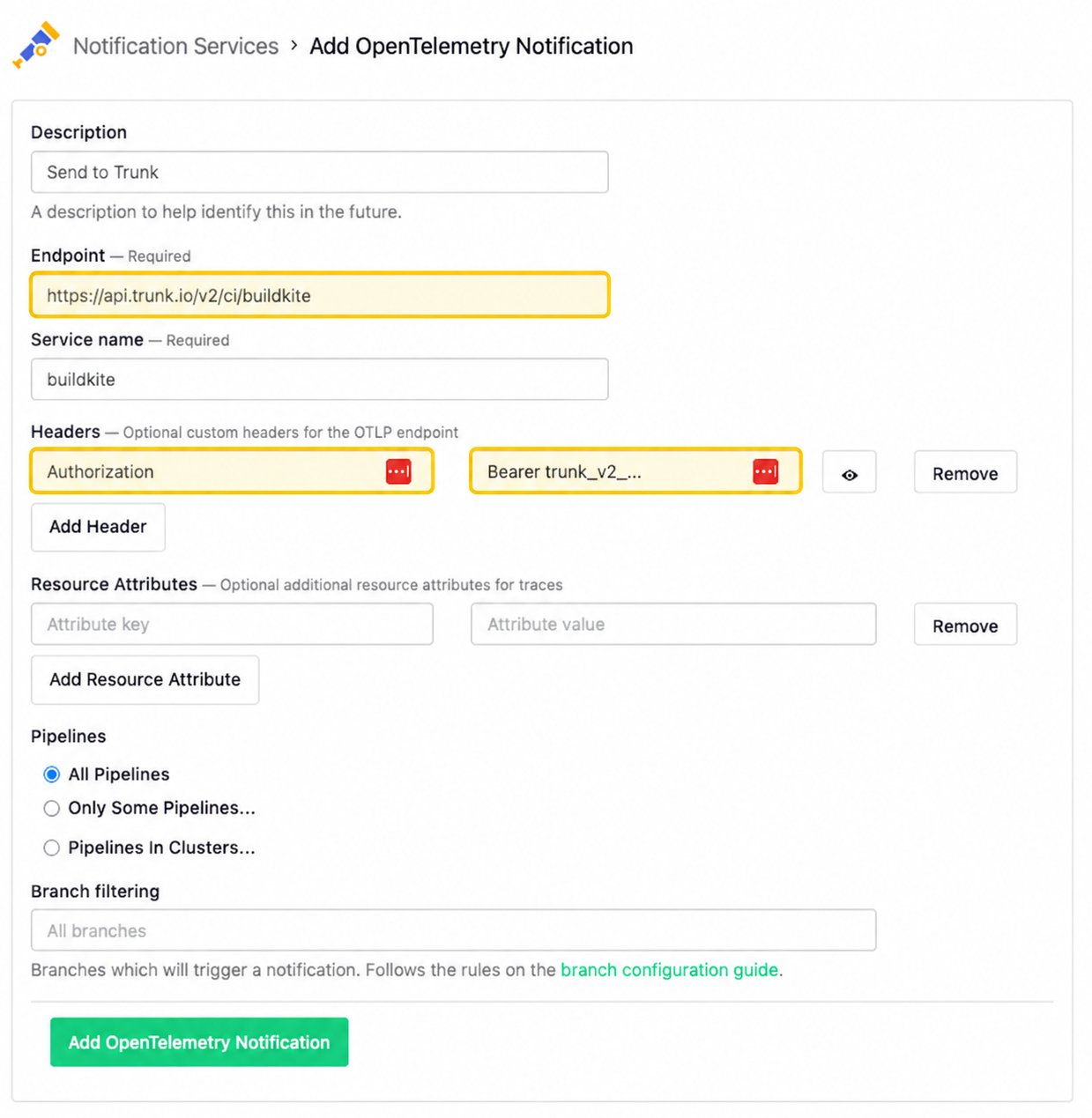
In BuildKite, navigate to **Settings** → **Notification Services**, then add an **OpenTelemetry Tracing** service.
#### Configure the notification service
In BuildKite, navigate to **Settings** → **Notification Services**, then add an **OpenTelemetry Tracing** service.
 | Field | Value |
| -------- | -------------------------------------------- |
| Endpoint | `https://api.trunk.io/v2/ci/buildkite` |
| Headers | `Authorization: Bearer ` |
## Troubleshooting
**Nothing arrives at all.** The endpoint answers `401` for a token it does not
recognize and `200` for everything it accepts, including an export it skips.
Check the token first, then the repository gate below.
**Builds arrive for one pipeline but not another.** Each pipeline is matched to
a Trunk repository through its own git remote. Confirm the remote resolves to a
repository that exists in your Trunk organization and has **CI Intelligence**
on.
**A repository was just enabled and still shows nothing.** The gate is cached
for up to 30 seconds. Trigger another build.
**Jobs show as running forever.** Trunk closes a BuildKite job on the state Buildkite reports it finishing in. If you see this on a real pipeline, tell us -
Buildkite's OTLP vocabulary differs from its REST API's, and an unrecognized
state is deliberately treated as still-running rather than as a failure.
A few BuildKite specifics are worth knowing:
* **Queue wait is inferred.** Buildkite reports when a job became runnable
and when it started, rather than emitting a span for the wait, so Trunk builds
one from those two times.
* **Time held by a concurrency group is not queue time.** It is time waiting for
a concurrency slot, not for an agent, and is deliberately left out of queue
duration.
* **A retry is a new attempt of the same step.** BuildKite gives each retry a
fresh job id and reuses the build, so Trunk numbers attempts by when each one
became runnable.
| Field | Value |
| -------- | -------------------------------------------- |
| Endpoint | `https://api.trunk.io/v2/ci/buildkite` |
| Headers | `Authorization: Bearer ` |
## Troubleshooting
**Nothing arrives at all.** The endpoint answers `401` for a token it does not
recognize and `200` for everything it accepts, including an export it skips.
Check the token first, then the repository gate below.
**Builds arrive for one pipeline but not another.** Each pipeline is matched to
a Trunk repository through its own git remote. Confirm the remote resolves to a
repository that exists in your Trunk organization and has **CI Intelligence**
on.
**A repository was just enabled and still shows nothing.** The gate is cached
for up to 30 seconds. Trigger another build.
**Jobs show as running forever.** Trunk closes a BuildKite job on the state Buildkite reports it finishing in. If you see this on a real pipeline, tell us -
Buildkite's OTLP vocabulary differs from its REST API's, and an unrecognized
state is deliberately treated as still-running rather than as a failure.
A few BuildKite specifics are worth knowing:
* **Queue wait is inferred.** Buildkite reports when a job became runnable
and when it started, rather than emitting a span for the wait, so Trunk builds
one from those two times.
* **Time held by a concurrency group is not queue time.** It is time waiting for
a concurrency slot, not for an agent, and is deliberately left out of queue
duration.
* **A retry is a new attempt of the same step.** BuildKite gives each retry a
fresh job id and reuses the build, so Trunk numbers attempts by when each one
became runnable.