> ## Documentation Index
> Fetch the complete documentation index at: https://docs.trunk.io/llms.txt
> Use this file to discover all available pages before exploring further.
# GitHub Integration
> Automate your code quality enforcement with just a few clicks.
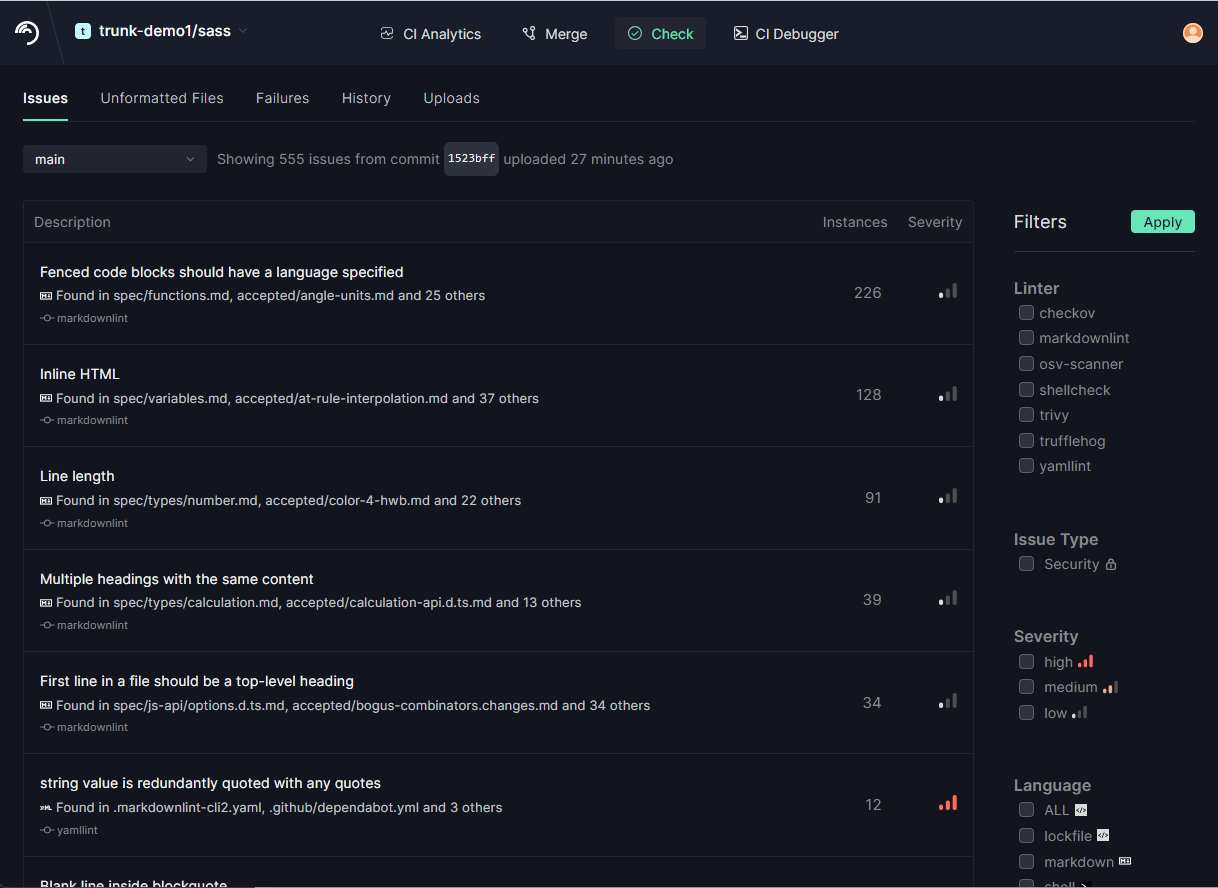
Trunk Code Quality has the ability to post its results to the [Trunk Code Quality web app](https://app.trunk.io/login?intent=code%20quality). This will enable you to view your repository's Code Quality history over time so you can track the trend of issues in your code, as well as browse the issues in your repository to help you understand which issues should be prioritized to fix.
## Connect your Trunk organization to GitHub
Sign up at [app.trunk.io](https://app.trunk.io/signup?intent=code%20quality), create a Trunk organization, and connect it to your repositories. You will need to grant the following [GitHub App permissions](/setup-and-administration/github-app-permissions).
## Set Up Trunk Code Quality
Once your Trunk organization is connected to GitHub, create a .trunk repo in your account or organization and grant Trunk permissions to access the repo. The .trunk repo will hold the workflows to scan your codebase and pull requests. [Learn more about the .trunk repo](/code-quality/overview/setup-and-installation/github-integration#what-is-a-.trunk-repository).
## Configure Slack Notifications (optional)
If you would like to receive notifications for new issues Trunk finds in your repo, you can configure Trunk to be connected to Slack.
## Use it!
### Ensure that PRs are free of issues
Check out [this example](https://github.com/trunk-io/plugins/pull/424/checks?check_run_id=15730277425) in our `plugins` repository!
.png?fit=max&auto=format&n=FEDBBs5EPDEY6kRF&q=85&s=24ff7488207626969f393c23399a55ce)
## Scanning your repository
Trunk Code Quality can scan your repository for Code Quality issues on a daily cadence, upload them to Trunk for you to review at your convenience, and notify you via Slack whenever new issues are discovered in your repository.
This allows you to build confidence in the code health of your repositories:
* You will be alerted quickly in a [Heartbleed-type](https://heartbleed.com/) event, giving you assurances about whether or not a newly discovered vulnerability affects any of your repositories, and
* You can monitor how many Code Quality issues exist in each of your repositories and make data-driven decisions about prioritizing efforts to reduce tech debt
If you don't want Trunk Code Quality to scan your repository on a daily cadence or notify you, you can turn it off in [your repository's settings](https://app.trunk.io/signup?intent=code%20quality).
 ### Get Slack notifications about new issues in your repository
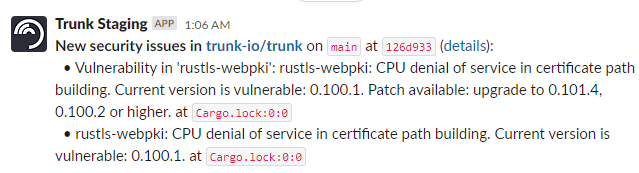
Not only do our daily scans allow you to browse and triage the issues in your repository, but they can also notify you when new security issues are discovered in packages you already depend on.
### Get Slack notifications about new issues in your repository
Not only do our daily scans allow you to browse and triage the issues in your repository, but they can also notify you when new security issues are discovered in packages you already depend on.
## Checking pull requests
Trunk Code Quality can automatically detect new Code Quality issues on your pull requests and flag them so that you can prevent pull requests from introducing any new issues in your repository.
When running on a pull request, Trunk Code Quality will only flag *new* issues, not existing ones, so that your engineers don't have to fix pre-existing linter issues in every file they touch - this is the same [hold-the-line technology](/code-quality/overview#hold-the-line) that our VSCode extension and CLI use.
To confirm that you've fixed issues identified by Trunk Code Quality before pushing your pull request, just run `trunk check`.
If Trunk continues to identify new Code Quality issues on your PR, first try merging the latest changes from your base branch. When Trunk runs on a PR, it runs on a commit that merges your PR into its base branch, just like GitHub workflows.
If this continues to fail, then run `git checkout refs/pull//merge && trunk check`. This is a reference to the merge commit GitHub creates.
You can include `/trunk skip-check` in the body of a PR description (i.e. the first comment on a given PR) to mark Trunk Code Quality as "skipped". Trunk Code Quality will still run on your PR and report issues, but this will allow the PR to pass a GitHub required status check on `Trunk Check`.
This can be helpful if Code Quality is flagging known issues in a given PR that you don't want to [ignore](/code-quality/overview/linters/ignoring-issues-and-files), which can come in handy if you're doing a large refactor.
If you don't want Trunk Code Quality to run on pull requests, turn it off in [your repository's settings](https://app.trunk.io/login?intent=code%20quality).
### Uploading Results
The upload feature of Trunk Code Quality will upload all of the issues found by Trunk to the Trunk services. In order to get an accurate picture of the state of your repository, you'll want to upload all of the Trunk Code Quality issues for your whole repository.
Generally this should be done within your Continuous Integration system (CI) automatically whenever **pull requests are filed or pushed to a specific branch** in your repo. Trunk Code Quality can also **run periodically** to check for new vulnerabilities in your dependencies.
### How Does It Work?
Under the hood, the GitHub integration does the following to your organization to enable Trunk Code Quality in GitHub Actions Workflows:
* An installation of the Trunk.io GitHub app in your GitHub organization
* A `.trunk` repository in your GitHub organization.
### What is a `.trunk` repository?
The `.trunk` repository contains the workflows run to scan your codebase and pull requests. We recommend creating a `.trunk` repository in your GitHub organization using [this template repository](https://github.com/trunk-io/.trunk-template).
Your `.trunk` repository must be added to your Trunk GitHub app installation. You can verify this by navigating to: `https://github.com/organizations//settings/installations`, clicking "configure" next to Trunk-io, and verifying that the repository access is either "All repositories" or that your `.trunk` repository is selected.
To find Code Quality issues in your repositories and pull requests, we dispatch GitHub Actions workflows in your `.trunk` repository, which check out your repositories and pull requests and then run `trunk check` in them. This strategy allows you to:
* start using Trunk Code Quality in all your repositories without any configuration, and
* be in full control over the environment where we analyze your code, since we're running on your GitHub Actions runners.
`.trunk` should have private visibility
Since we use workflow runs in `.trunk` to analyze any repository in your organization and record Code Quality findings, you should think carefully about who has permissions to view workflow runs in your `.trunk` repository. For most organizations, simply making your `.trunk` repository private will be sufficient.
## (optional) Custom setup logic
If you need to do some setup before `trunk check` runs in `your-org/your-repo`, you can [define a GitHub composite action](https://docs.github.com/en/actions/creating-actions/creating-a-composite-action) in `.trunk/setup-ci/action.yaml` in `your-repo`. This can be important if, for example, a linter needs some generated code to be present before it can run:
```yaml theme={null}
name: Trunk Code Quality setup
description: Set up dependencies for Trunk Code Quality
runs:
using: composite
steps:
- name: Build required trunk check inputs
shell: bash
run: bazel build ... --build_tag_filters=pre-lint
- name: Install eslint dependencies
shell: bash
run: npm install
```
Read more in the documentation for [our GitHub Action](https://github.com/trunk-io/trunk-action#custom-setup).