> ## Documentation Index
> Fetch the complete documentation index at: https://docs.trunk.io/llms.txt
> Use this file to discover all available pages before exploring further.
# Test Collections
> Group tests into named collections, each with its own flake detection, quarantining, and ticketing settings.
A test collection is a named group of tests with its own settings. Each collection has independent flake detection, quarantining, and ticketing, so you can hold fast unit tests and fragile end-to-end tests to different standards.
You create a collection in the Trunk app, then point a CI job at it by passing the collection's ID to the uploader.
 ## Collections and repositories
Collections and repositories are many-to-many. A collection can include tests from multiple repositories, and a repository can be broken into multiple collections. This is decided by which collection you specify at upload time.
## Collections and repositories
Collections and repositories are many-to-many. A collection can include tests from multiple repositories, and a repository can be broken into multiple collections. This is decided by which collection you specify at upload time.
 ## The Collection ID
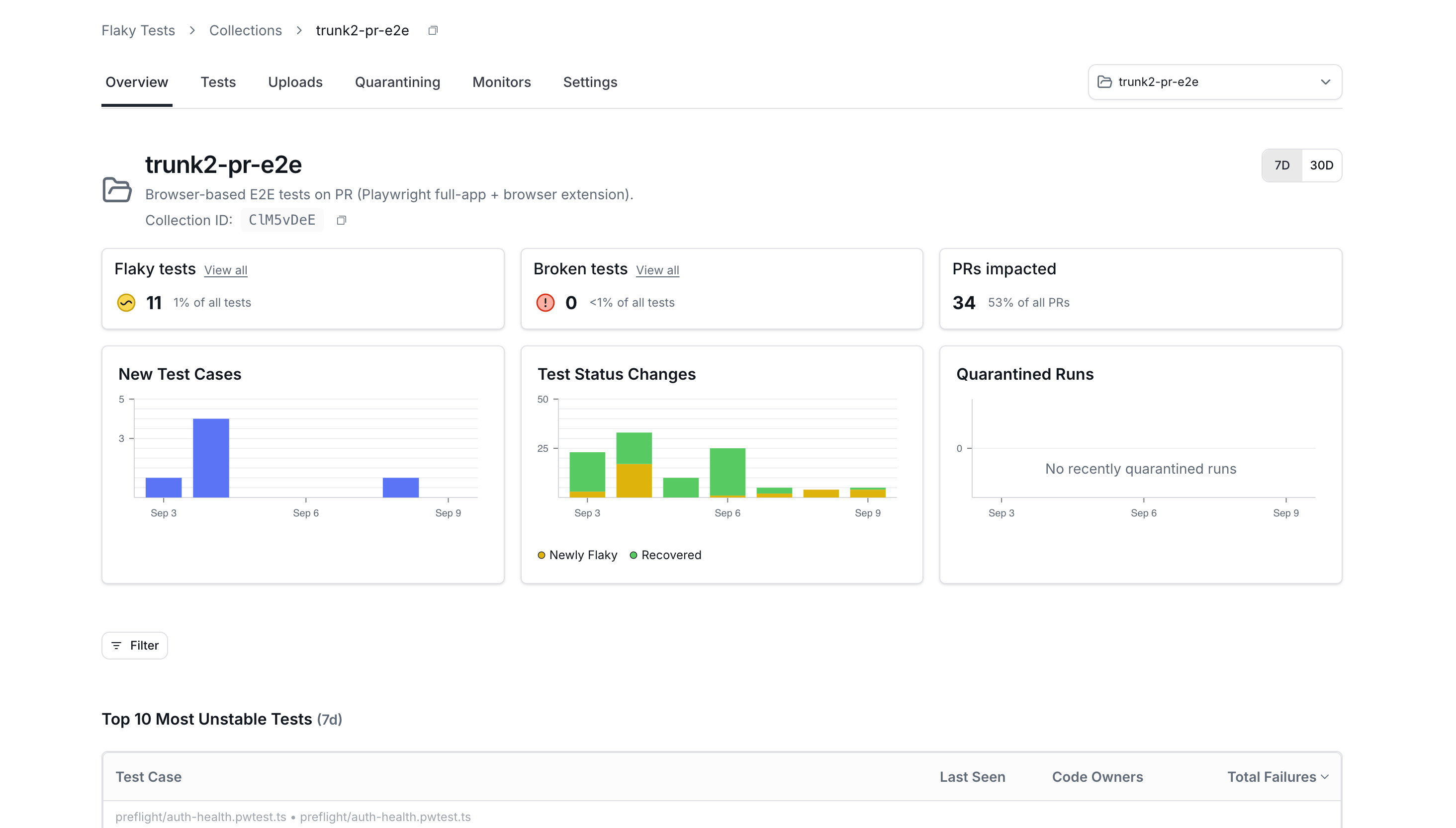
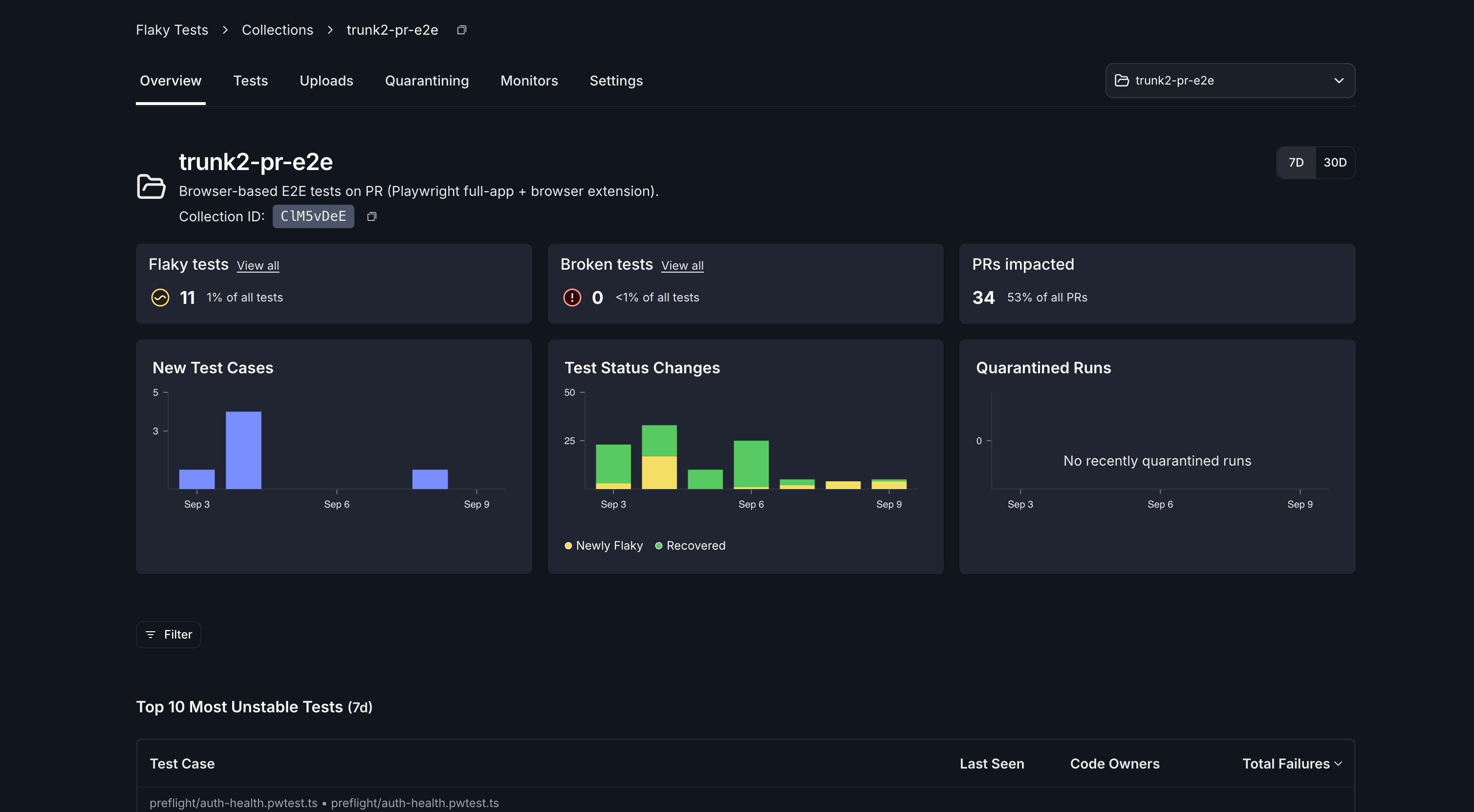
Every collection has an ID: eight alphanumeric characters, unique across all of Trunk. It appears in the collection's URL, on the collection's page header, and in the **ID** column of the collections list, each with a button to copy it.
```
https://app.trunk.io//flaky-tests/collections/
```
The ID is what CI needs. Nothing else about a collection is used to route uploads.
## Create a collection
Any member of your organization can create a collection.
1. In Flaky Tests, open **Collections**.
2. Click **Create Collection**.
3. Enter a **Collection name**, and a description if you want one.
4. Click **Create collection**.
You land on the new collection. Its **Tests** and **Uploads** tabs stay disabled until test results arrive.
## What a new collection starts with
A new collection starts with a basic set of flake-detection monitors, so detection starts working as soon as test results arrive.
You can change them, and everything else about the collection, from its **Monitors** and **Settings** tabs.
## Upload test results to a collection
Pass the collection ID to the uploader alongside your organization slug. Both are required:
```bash theme={null}
./trunk-analytics-cli upload \
--junit-paths "test_output.xml" \
--org-url-slug \
--test-collection-id \
--token $TRUNK_API_TOKEN
```
You can set the ID as the `TRUNK_TEST_COLLECTION_ID` environment variable instead, or pass it as the `test-collection-id` input to the [uploader action](./get-started/ci-providers/github-actions).
Everything else about your setup is unchanged. Adding the collection ID to a working upload step is the whole change. See [**Test Frameworks**](./get-started/frameworks/) and [**CI Providers**](./get-started/ci-providers/) for the setup itself, and the [**CLI reference**](./reference/cli-reference#test-collections) for the full flag list.
A CI job uploads to exactly one collection. To send results to more than one collection, add an upload step per collection.
## Collection tabs
| Tab | What it holds |
| ---------------- | ----------------------------------------------------------------------------------------------------------------------------------------------------- |
| **Overview** | Setup instructions before results arrive; the collection's dashboard afterwards. |
| **Tests** | Every test in the collection, with health status, failure rates, and labels. |
| **Uploads** | Upload history for the collection. |
| **Quarantining** | Quarantine analytics for the collection. |
| **Monitors** | The collection's [flake detection monitors](./detection/). |
| **Settings** | The collection's name and description, [quarantining](./quarantining/), upload handling, and [ticketing](./management/ticketing/automatic-ticketing). |
## Finish setting up a collection
Each collection has a setup checklist, on its **Overview** tab before results arrive and on its **Settings** tab permanently. It tracks four steps:
1. **Send your first upload**
2. **Ingest your test results**
3. **Review flake detection**
4. **Review quarantining**
The first two complete on their own once uploads are flowing. The rest can be configured in the app.
## Permissions
| Action | Admin | Member |
| --------------------------------------- | ----- | ------ |
| View collections | Yes | Yes |
| Create a collection | Yes | Yes |
| Edit a collection's name or description | Yes | No |
| Change quarantining settings | Yes | No |
| Delete a collection | Yes | No |
## Delete a collection
Only organization admins can delete a collection.
1. Open the collection's **Settings** tab.
2. Click **Delete collection**.
3. Confirm in the dialog.
The collection disappears from the collections list. Test results already uploaded to it are not deleted.
## Questions
Ask us in [Slack](https://slack.trunk.io) or email [support@trunk.io](mailto:support@trunk.io).
## The Collection ID
Every collection has an ID: eight alphanumeric characters, unique across all of Trunk. It appears in the collection's URL, on the collection's page header, and in the **ID** column of the collections list, each with a button to copy it.
```
https://app.trunk.io//flaky-tests/collections/
```
The ID is what CI needs. Nothing else about a collection is used to route uploads.
## Create a collection
Any member of your organization can create a collection.
1. In Flaky Tests, open **Collections**.
2. Click **Create Collection**.
3. Enter a **Collection name**, and a description if you want one.
4. Click **Create collection**.
You land on the new collection. Its **Tests** and **Uploads** tabs stay disabled until test results arrive.
## What a new collection starts with
A new collection starts with a basic set of flake-detection monitors, so detection starts working as soon as test results arrive.
You can change them, and everything else about the collection, from its **Monitors** and **Settings** tabs.
## Upload test results to a collection
Pass the collection ID to the uploader alongside your organization slug. Both are required:
```bash theme={null}
./trunk-analytics-cli upload \
--junit-paths "test_output.xml" \
--org-url-slug \
--test-collection-id \
--token $TRUNK_API_TOKEN
```
You can set the ID as the `TRUNK_TEST_COLLECTION_ID` environment variable instead, or pass it as the `test-collection-id` input to the [uploader action](./get-started/ci-providers/github-actions).
Everything else about your setup is unchanged. Adding the collection ID to a working upload step is the whole change. See [**Test Frameworks**](./get-started/frameworks/) and [**CI Providers**](./get-started/ci-providers/) for the setup itself, and the [**CLI reference**](./reference/cli-reference#test-collections) for the full flag list.
A CI job uploads to exactly one collection. To send results to more than one collection, add an upload step per collection.
## Collection tabs
| Tab | What it holds |
| ---------------- | ----------------------------------------------------------------------------------------------------------------------------------------------------- |
| **Overview** | Setup instructions before results arrive; the collection's dashboard afterwards. |
| **Tests** | Every test in the collection, with health status, failure rates, and labels. |
| **Uploads** | Upload history for the collection. |
| **Quarantining** | Quarantine analytics for the collection. |
| **Monitors** | The collection's [flake detection monitors](./detection/). |
| **Settings** | The collection's name and description, [quarantining](./quarantining/), upload handling, and [ticketing](./management/ticketing/automatic-ticketing). |
## Finish setting up a collection
Each collection has a setup checklist, on its **Overview** tab before results arrive and on its **Settings** tab permanently. It tracks four steps:
1. **Send your first upload**
2. **Ingest your test results**
3. **Review flake detection**
4. **Review quarantining**
The first two complete on their own once uploads are flowing. The rest can be configured in the app.
## Permissions
| Action | Admin | Member |
| --------------------------------------- | ----- | ------ |
| View collections | Yes | Yes |
| Create a collection | Yes | Yes |
| Edit a collection's name or description | Yes | No |
| Change quarantining settings | Yes | No |
| Delete a collection | Yes | No |
## Delete a collection
Only organization admins can delete a collection.
1. Open the collection's **Settings** tab.
2. Click **Delete collection**.
3. Confirm in the dialog.
The collection disappears from the collections list. Test results already uploaded to it are not deleted.
## Questions
Ask us in [Slack](https://slack.trunk.io) or email [support@trunk.io](mailto:support@trunk.io).