

pull_request events from a fork run with read-only permissions and can’t read repository secrets, so $TRUNK_API_TOKEN is empty. Trunk lets these runs upload without a token through an opt-in you control.
There are two ways to opt in. Which one you use depends on where the results go:
This is intended for public repositories that accept outside contributions. For private repositories or forks inside your organization, keep using
$TRUNK_API_TOKEN.Test collections
1. Enable forked pull request uploads on the collection
In the Trunk web app, open the collection, go to Settings → Uploads, and turn on Accept uploads from forked pull requests. Only organization admins can change this setting. Trunk does not issue a separate identifier for this. The fork run addresses the collection by its collection ID, the same eight-character ID you already pass with--test-collection-id.
2. Upload from the fork workflow
With the Trunk uploader action, setallow-forked-pr-uploads: true alongside test-collection-id. Leave out token:
analytics-uploader v2.1.4 or later, which the @v2 tag already resolves to, and analytics-cli 0.15.5 or later. The action installs the latest CLI unless you pin an older one with cli-version.
If you call the CLI directly, pass --allow-forked-pr-uploads together with --test-collection-id, or set TRUNK_ALLOW_FORKED_PR_UPLOADS=true and TRUNK_TEST_COLLECTION_ID:
--allow-forked-pr-uploads without a collection ID is an error, because the collection’s own setting is what authorizes the upload.
allow-forked-pr-uploads is a mode you choose explicitly, not a fallback. A workflow that passes a token but whose token secret didn’t resolve still fails loudly rather than silently uploading without one.How authorization works
The collection ID is not a secret. It is safe to commit in your workflow file, and it shows up in links and webhooks anyway. The ID alone grants nothing: Trunk accepts a forked upload only while the collection has Accept uploads from forked pull requests turned on.- To stop accepting forked uploads, turn the setting off. It takes effect within about a minute.
- An upload that names a collection that doesn’t exist, is deleted, or doesn’t have the setting on is refused. The response is the same in every case, so a refusal doesn’t reveal which collections exist.
- A refused upload from a fork logs a warning and exits successfully, so a contributor’s pull request doesn’t fail because of it.
Repositories without a test collection
If you upload to a repository rather than to a collection, the opt-in is on the repository and comes with a non-secret public repo identifier that the fork run uses in place of the token.1. Enable fork PR uploads on the repository
In the Trunk web app, go to Settings → Repositories → [your repo] → Flaky Tests and turn on Fork PR Uploads. Copy the Public Repo Identifier that appears below the toggle. It is an eight-character alphanumeric code scoped to that one repository. Only organization admins can change this setting.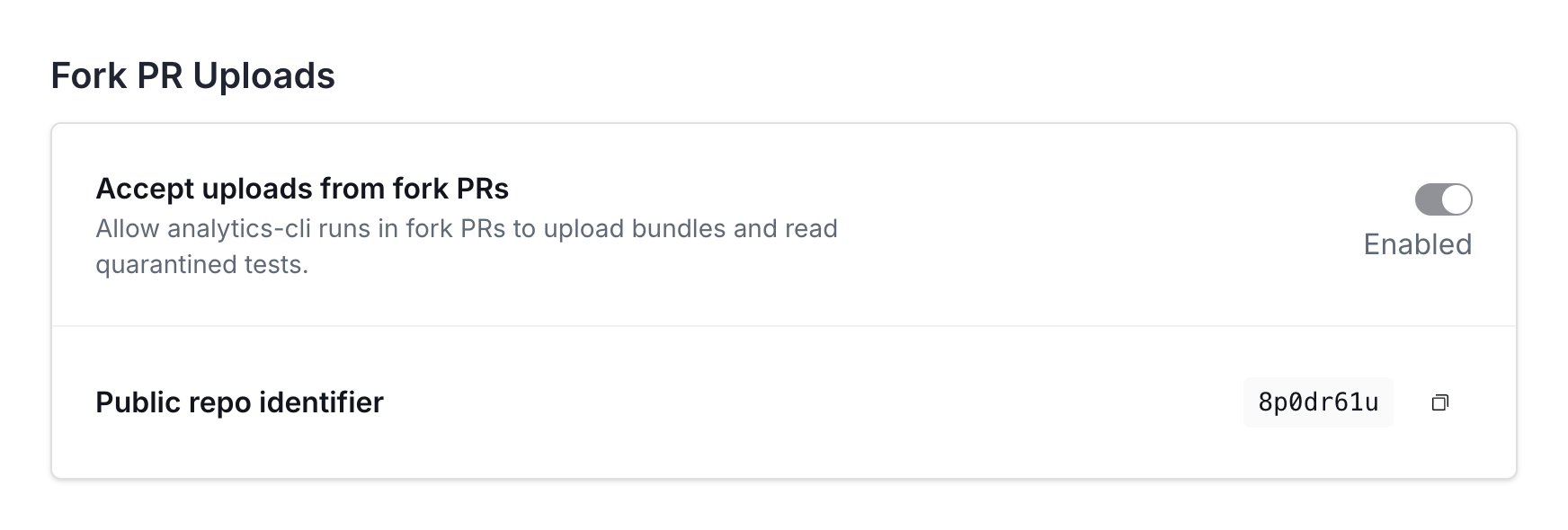
2. Upload from the fork workflow
With the Trunk uploader action, set thepublic-repo-id input in place of token:
--public-repo-id <YOUR_8_CHAR_IDENTIFIER> or set the TRUNK_PUBLIC_REPO_ID environment variable. Either way the CLI sends the value on the X-Trunk-Public-Repo-Id header.
How authorization works
The public repo identifier is not a secret, and it is safe to commit in your workflow file. Do not put your org API token in a fork PR workflow. Trunk accepts a fork PR upload only when both of these hold:- The repository has Fork PR Uploads turned on.
- The upload targets the repository the identifier belongs to. An identifier only authorizes uploads to its own repository.