

Prerequisites
To use the Autofix Flaky Tests feature, you’ll need:- Beta access via waitlist (reach out to us at support@trunk.io)
- The Investigate Flaky Tests setting enabled on the repository, at Settings → Repositories → [your repository] → General
- Active installation of the Trunk GitHub App
Investigate Flaky Tests is a per-repository setting, and only organization admins can change it. Turning it off disables every kind of investigation for that repository, including ones you start by hand and ones started through MCP.

Auto-Investigate Flaky Tests
Once enabled, any time that Trunk detects a flaky test, Trunk analyzes the failure patterns, failure output, and git history of the test to provide a number of insights.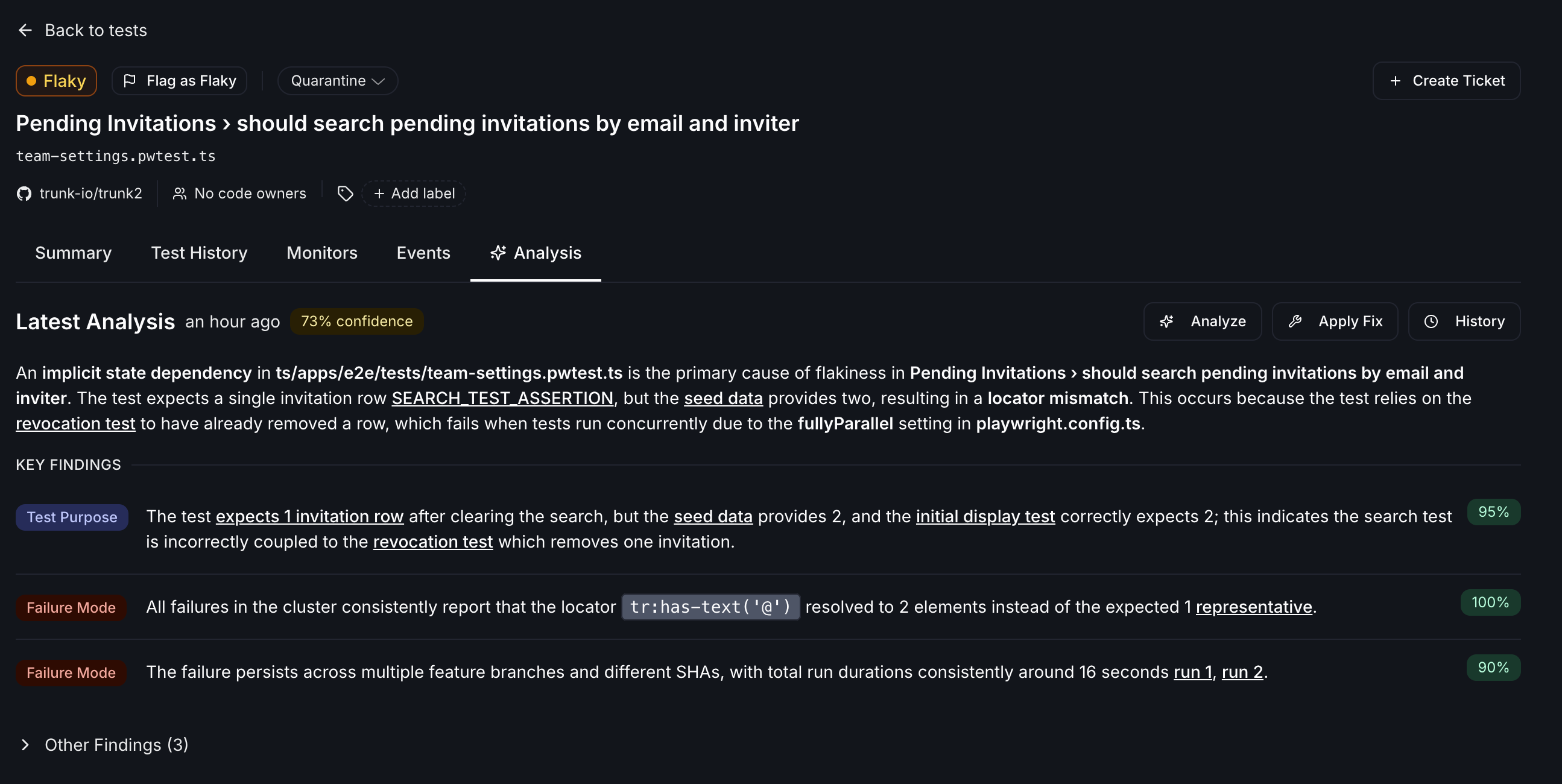
Investigation limits
Trunk caps how many investigations run automatically, so a burst of newly flaky tests can’t consume an unbounded amount of analysis. Two limits apply:
Both are counted per calendar month and reset on the first of the month. The per-test limit keeps a single test that repeatedly flips between healthy and flaky from consuming the whole repository’s budget.
What counts against the limits
- Automatic investigations, which Trunk starts when a test moves from Healthy to Flaky or Broken. Each transition starts one investigation, so a test that recovers and goes flaky again starts another.
- Investigations started through MCP, using the
fix-flaky-testtool withcreateNewInvestigation: true.
What doesn’t count
Investigations you start by hand from a test’s detail page in the Trunk app are exempt from both limits. They never count against your budget, and you can still run them after a repository or test has hit its cap.Skipped and failed analyses
When Trunk skips or fails an analysis, the Analysis tab shows a banner explaining what happened. Common reasons an analysis is skipped:- Monthly analysis limit reached. The repository or the test has used all of its investigations for the current calendar month. See Investigation limits. The banner shows how long ago the skip occurred.
- Analysis already in progress. A previous run is still queued; Trunk skips a new one to avoid duplicates.
Autofix with Cursor Automations
Whenever an investigation is completed, Trunk will emit a webhook fortest_case.investigation_completed. Enable webhooks via Svix.
You can then set up a Cursor Automation to trigger when webhooks are received.
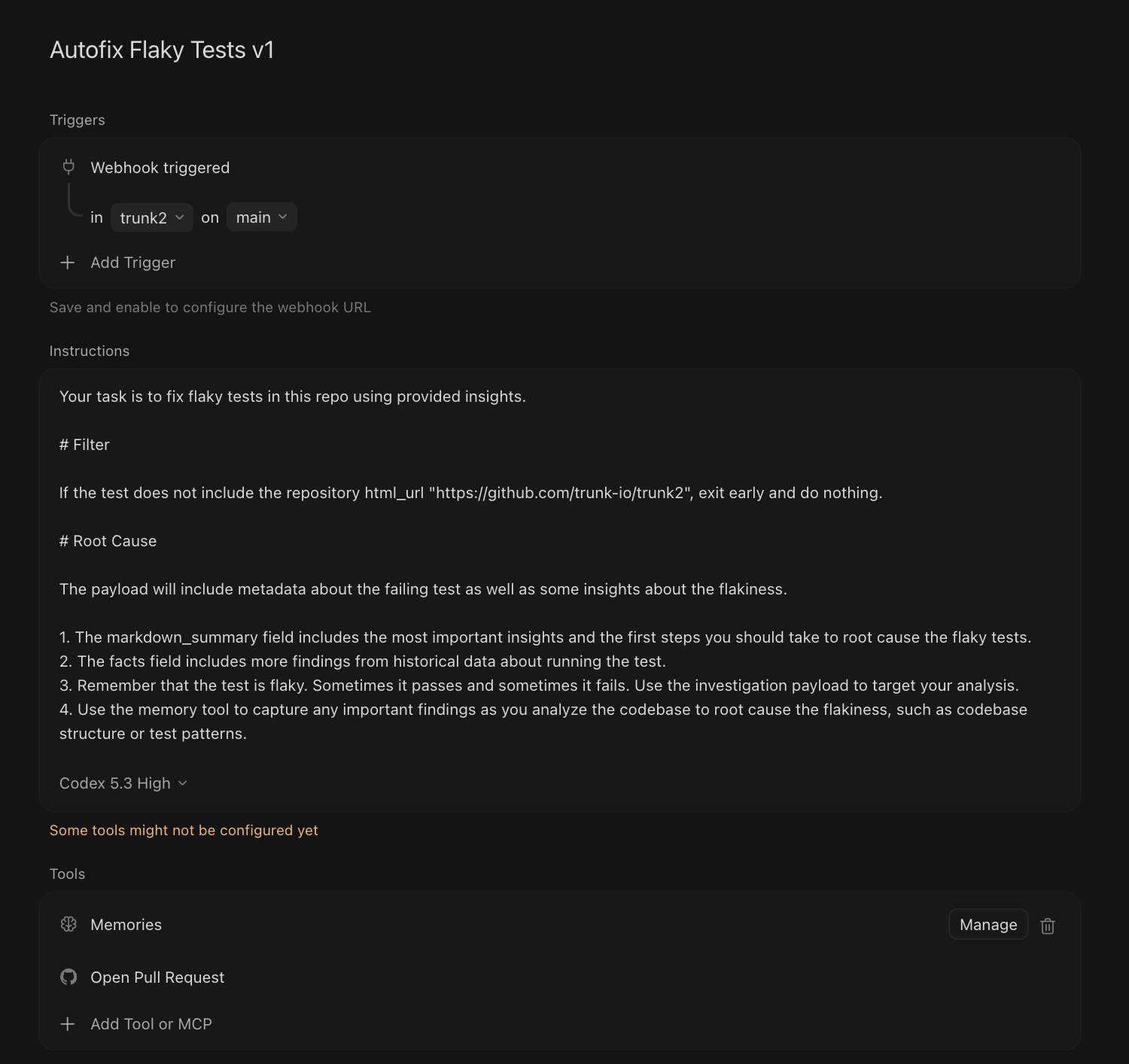
Recommended Cursor Automation Config
Recommended Cursor Automation Config
- Version your Automation names for more clarity.
- Configure the Svix endpoint with the Cursor Bearer token.
- Webhooks are configured for your entire organization, so you will need to use Svix transformations or filter out events that are not for your intended repository.
- Be specific about conventions and antipatterns for your repository. You will need to refine the Automation prompt to suit your needs.
- If your CI setup allows it, prompt Cursor to run the tests to verify them.
What’s next?
- Continue to monitor your tests to confirm the flaky test fixes are effective
- Investigations can be triggered and applied via MCP
Coming soon. Set up Claude Routines to autofix flaky tests