# Understand root cause analysis
When your pull request's CI fails, CI Autopilot automatically investigates the failure and posts a detailed analysis as a comment within a few minutes. This analysis helps you quickly understand what went wrong and how to fix it.
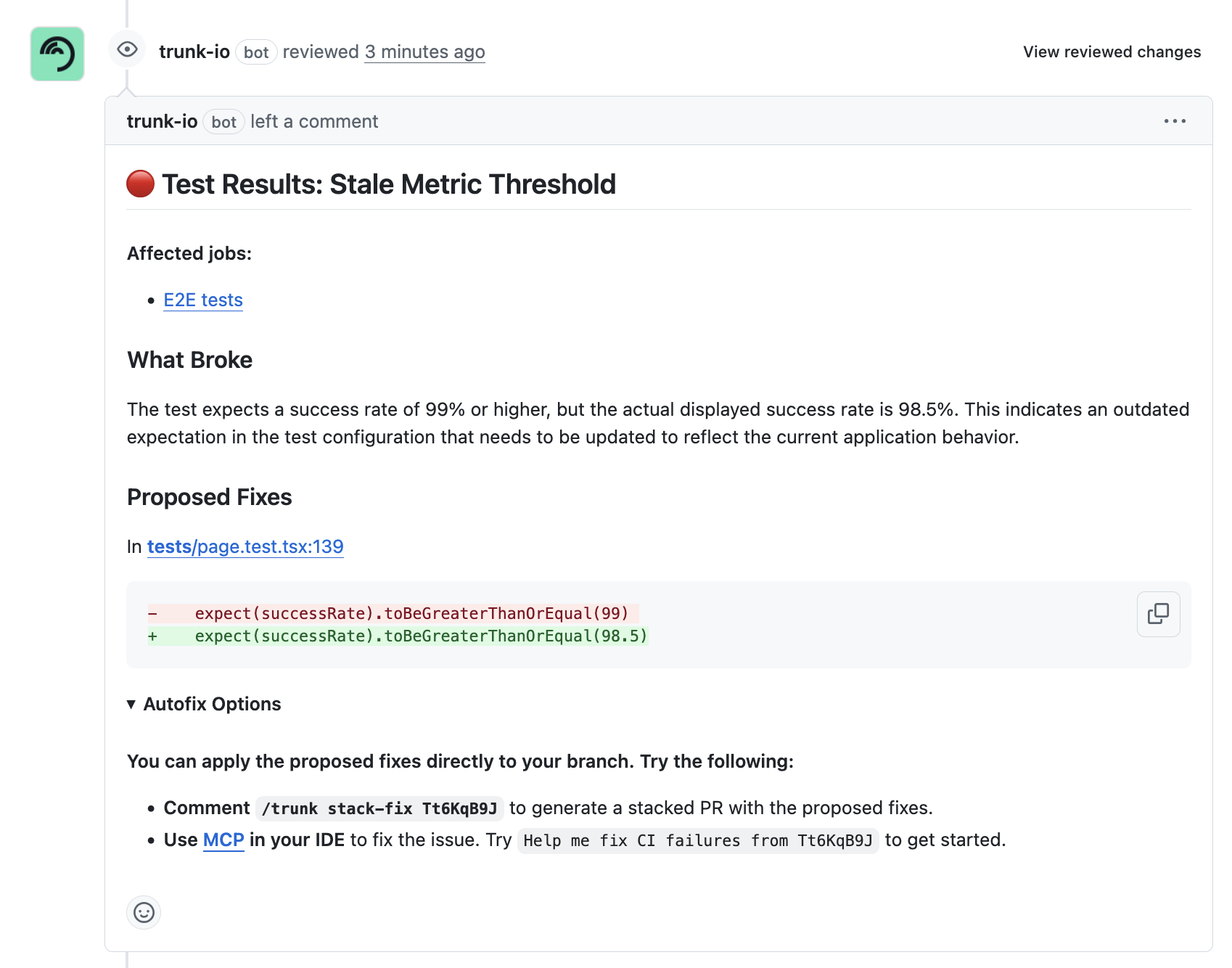
You'll know the analysis is complete when you see a comment from the `trunk-io` bot:
CI Autopilot PR Comment
Each comment includes the following details:
* **Test summary**: A brief description of the issue
* **Affected jobs or tests (when** [**test results are uploaded**](https://docs.trunk.io/ci-autopilot/overview/get-started/upload-test-reports)**)**: The jobs or a list of all the tests that failed with the same root-cause
* **Root-cause**: An explanation of the root cause, what changes caused it, and the effects
* **Proposed fixes:** Suggested code changes to fix the issue
* **Autofix options:** Instructions on how to apply the fix - either as a stacked pull request
### Why failure grouping matters
Instead of getting 15 separate comments for 15 related test failures, CI Autopilot groups them into a single comment when they share the same root cause. This means one fix can resolve multiple test failures.
### What's next?
After reviewing the root-cause analysis and fix suggestions, users can request fixes on PRs or apply them with [MCP](https://docs.trunk.io/flaky-tests/use-mcp-server).