

Prerequisites
Before configuring branch protection:- Trunk GitHub App installed and queue created (previous step)
- Repository has CI/CD configured (GitHub Actions, CircleCI, etc.)
- CI runs on pull requests and reports status checks to GitHub
- You have admin access to repository settings
How Branch Protection Affects the Queue
Trunk Merge Queue respects GitHub’s branch protection rules and works with both Classic branch protection rules and Rulesets. Branch protection plays two distinct roles in how the queue operates:- Admission into the queue — Trunk doesn’t admit a submitted PR for testing until GitHub considers it ready to merge. Branch protection (required reviews, required status checks, conversation resolution, etc.) is what determines when GitHub marks a PR as ready to merge, so it directly controls when a PR enters the queue.
- Required checks during testing (optional) — By default, Trunk waits on the same required status checks defined in your branch protection rules while testing a PR in the queue. You can override this with the Trunk UI or
.trunk/trunk.yamlif you want a different set of checks required during queue testing. See Required Status Checks.
trunk-io bot, and excluding trunk-temp/**/* and trunk-merge/**/* from protection) ensure branch protection doesn’t block Trunk from doing its job. They don’t change either of the roles above.
Choose your testing approach
Trunk Merge Queue can test pull requests in two ways. Choose the approach that fits your CI setup:Draft PR mode (Recommended - Default)
Best for: Most teams who want the simplest setup with no additional
configuration.
- No additional CI configuration required
- Works immediately with your existing workflows
- Simple to set up and maintain
- This mode also creates a
trunk-merge/branch - Trunk automatically closes the draft PRs and merge the original PRs
Push-Triggered mode (Advanced)
Best for: Teams who need different CI behavior for merge queue testing
versus pull request review.
trunk-merge/ and pushes to it. You configure specific CI jobs to run on these branches.
Advantages:
- Complete control over which jobs run during queue testing
- Avoid triggering expensive preview environments or review-only workflows
- Can optimize for faster merge queue throughput
- Configure push-triggered workflows in your CI provider for
trunk-merge/**branches (see Configure CI status checks)
Configure Branch Protection Rules
Rulesets vs. Classic branch protection
GitHub offers two systems for branch protection: Rulesets and Classic branch protection rules. Both can coexist on the same branch. The Trunk Merge Queue GitHub App is fully supported on both systems. Rulesets are recommended for two reasons:- Rulesets allow more granular protections. You can layer multiple targeted rulesets on the same branch with per-actor bypass control — finer-grained than what Classic rules can express.
- Repository admins can be held to the rule. With Classic branch protection, admins bypass by default and see a green Merge button on every PR — easy to misclick into a merge that skips the queue. Rulesets flip the default: admins are subject to the rule unless they’re explicitly on the bypass list, and even when they are, GitHub displays a red warning that they’re circumventing branch protection — much harder to misclick through than a green button.
Option A — GitHub Rulesets (recommended)
Trunk Merge Queue requires at least two rulesets on your protected branch:- Ruleset #1 restricts who can update the branch and lists Trunk on its bypass list as Exempt so Trunk can push merges through the queue.
- Ruleset #2 holds your mergeability requirements (required reviews, required status checks, conversation resolution, etc.) and does not bypass Trunk. The queue uses these rules to decide when GitHub considers a PR ready, which is what gates admission into the queue.
- In GitHub, navigate to Settings → Rules → Rulesets and create a new ruleset (e.g., name it
main - force push). - Under Target branches, target the protected branch only (e.g.,
main). No exclude pattern is needed for this ruleset — Trunk’strunk-temp/**/*andtrunk-merge/**/*branches are not in the include list, so they aren’t matched. Other rulesets (especially at the organization level) may still need explicit excludes; see Exempt Trunk’s temporary branches from other rulesets below. - Under Rules → Branch rules, enable Restrict updates (“Only allow users with bypass permission to update matching refs”). You can optionally co-locate Restrict deletions and Restrict creations in the same ruleset; the bypass list applies to the entire ruleset.
- Under Bypass list, add the Trunk GitHub App (
trunk-io) and set its bypass mode to Exempt. - If you also use Trunk Sudo, add Trunk Sudo to the bypass list as Exempt as well.
- Save.
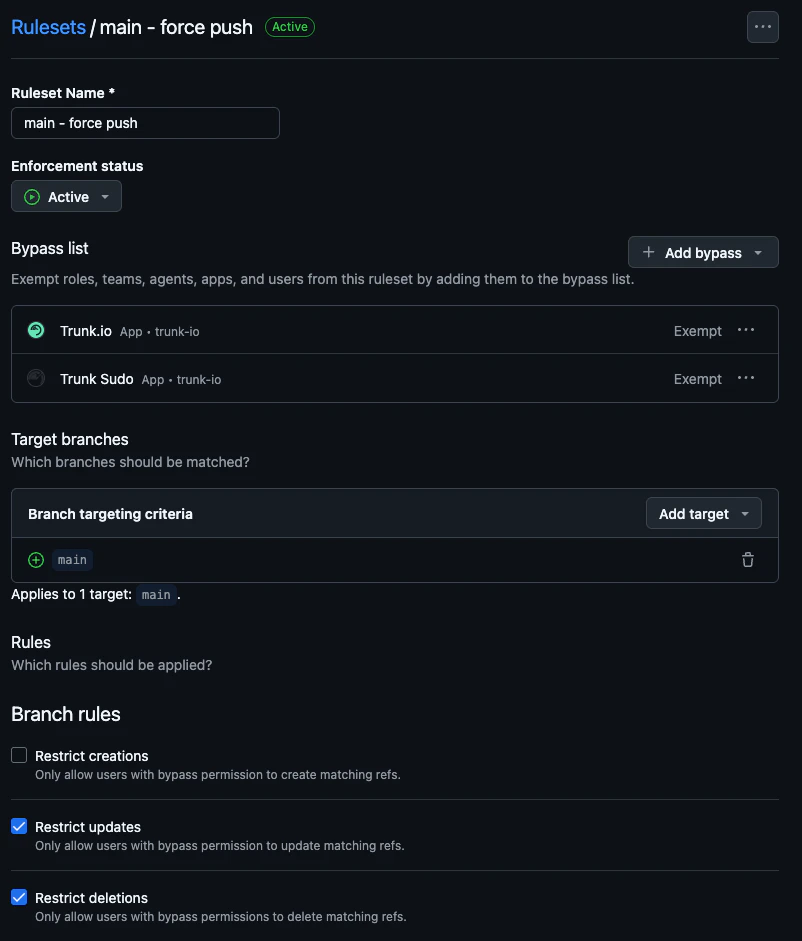
Ruleset #1: Trunk on the bypass list as Exempt so it can update main.
Bypass mode defaults to Always — change it to Exempt. When you add an
actor to a ruleset’s bypass list, GitHub defaults its bypass mode to
Always, which sounds permissive but does not cover branch updates from a
GitHub App. Trunk must be set to Exempt. If Trunk isn’t Exempt, merges
will fail with permission errors on the protected branch.
- Create a second ruleset (e.g., name it
main - PRs). - Target the same protected branch (e.g.,
main) with the same single-include targeting. - Under Rules → Branch rules, add the rules that gate mergeability — typically Require a pull request before merging and Require status checks to pass. Add others (signed commits, linear history, etc.) as your team requires.
- Do not add the Trunk GitHub App (
trunk-io) to the bypass list. The queue relies on GitHub reporting the PR as not-yet-ready until these rules pass. - Optionally, add Trunk Sudo to the bypass list as Exempt if you use Direct to queue. See the Trunk Sudo page for the full guidance.
- Save.
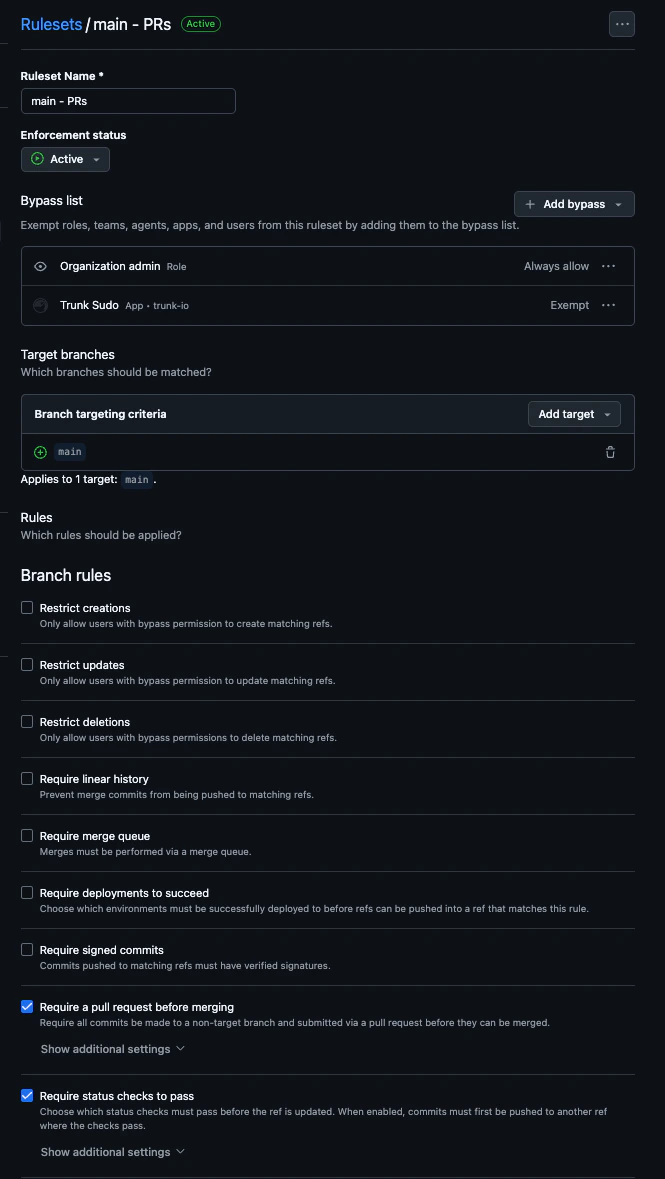
Ruleset #2: Trunk is not on the bypass list, so the queue respects these requirements when admitting PRs.
trunk-temp/**/* or trunk-merge/**/*. But any other Branch ruleset — at the organization level or elsewhere on this repository — whose targeting is broader (e.g., All branches, or a wildcard include like **/*) will match Trunk’s temporary branches and block the queue.
Symptom: A PR enters the queue and then fails out shortly after testing
starts with a GitHub permission error (e.g., “Permission denied on
trunk-merge/* branch”). You’ll see this on the Trunk Merge Queue status
check on the PR, in Trunk’s status comment on the PR, and on the PR’s detail
page in the Trunk dashboard. This almost always means
a Branch ruleset is preventing Trunk from creating, pushing to, or deleting
trunk-temp/**/* or trunk-merge/**/*.- Organization-level rulesets — at the organization’s Settings → Rules → Rulesets page. These apply across every repository and are the most commonly missed source of conflicts.
- Other repository-level Branch rulesets — any Branch ruleset on this repo other than the two created above.
trunk-temp/**/* or trunk-merge/**/* (anything broader than a single protected-branch include):
- Edit the ruleset.
-
Under Branch targeting criteria, click Add target → Exclude by pattern and add both:
trunk-temp/**/*trunk-merge/**/*
The trailing/*is required. GitHub treatstrunk-temp/**andtrunk-temp/**/*differently, and only the latter actually matches (and therefore excludes) the branches Trunk creates. - Save.
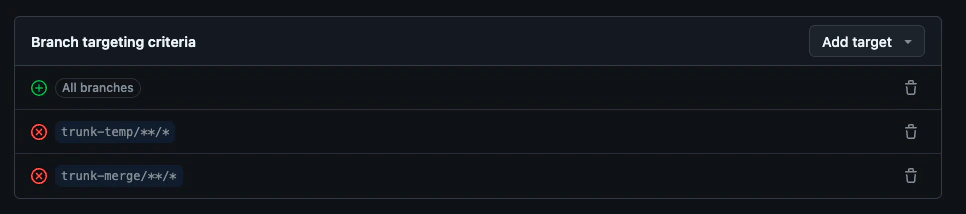
Add trunk-temp/**/* and trunk-merge/**/* as exclude patterns on any Branch ruleset whose targeting could otherwise match them.
- Ruleset #1 targets only your protected branch and has the Trunk GitHub App on the bypass list as Exempt.
- Ruleset #2 targets only your protected branch and does not bypass Trunk.
- Every other Branch ruleset visible at the organization level and on this repository either does not match
trunk-temp/**/*/trunk-merge/**/*, or explicitly excludes both patterns. - (If using Trunk Sudo) Trunk Sudo is on Ruleset #1’s bypass list as Exempt.
- (If using Trunk Sudo and Direct to queue) Trunk Sudo is also on Ruleset #2’s bypass list as Exempt.
Migrating from Classic rules to Rulesets
If you already use Classic branch protection, GitHub provides an Import a ruleset action on the Rulesets page that converts an existing Classic rule into a single ruleset. Use it as a starting point, then split the imported ruleset into the two-ruleset structure above: move Restrict updates into Ruleset #1 with Trunk on the bypass list as Exempt, and leave the rest in Ruleset #2 with no bypass on Trunk.Option B — Classic branch protection
Classic branch protection still works with Trunk Merge Queue, but is no longer the recommended path. Some Classic rules (required status checks and “Require branches to be up to date”) cannot be bypassed by any GitHub App, which limits features like Direct to queue. Use Rulesets when you can. Configure push restrictions (required) Trunk Merge Queue needs permission to push to your protected branch. Configure these settings using Classic branch protection rules: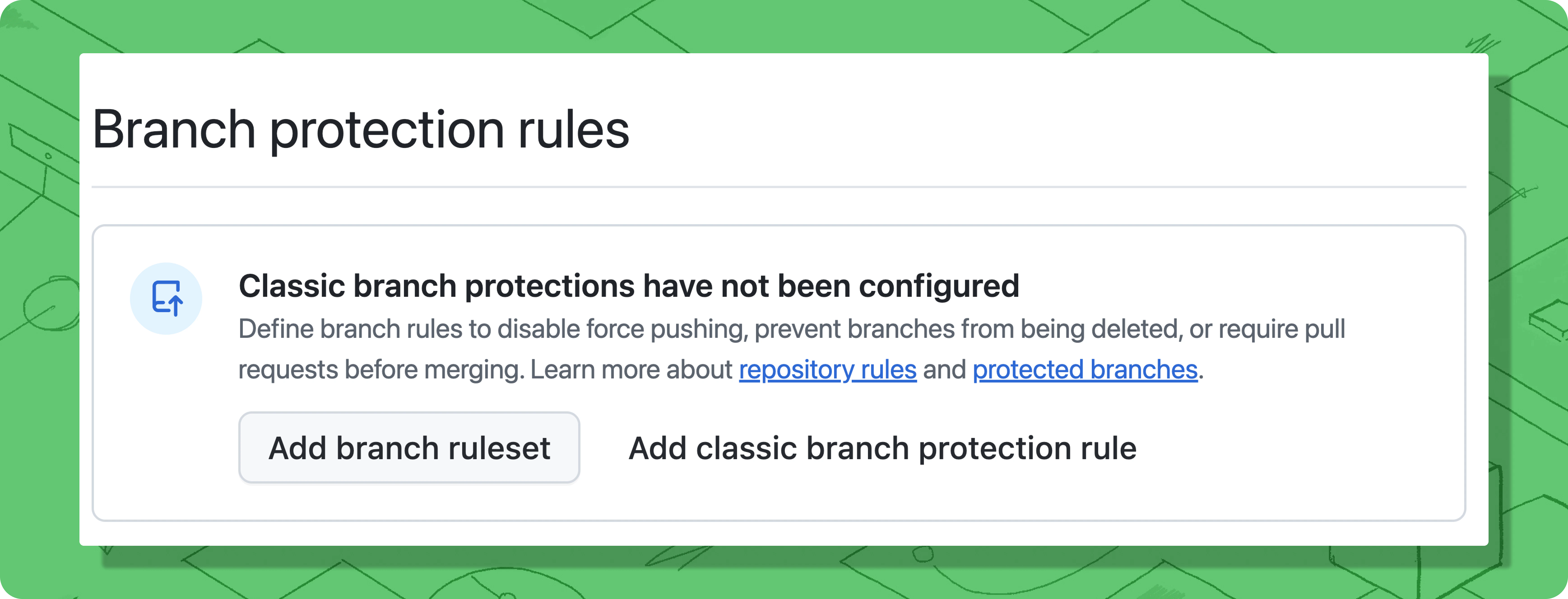
- Navigate to Settings → Branches in your repository on GitHub.
- Edit or create a Classic branch protection rule for your target branch (e.g.,
main). - Under “Rules applied to everyone including administrators,” select:
- Restrict who can push to matching branches
- Restrict pushes that create matching branches
- Add the
trunk-iobot to the list of allowed actors. - Optionally, add Organization admins and repository admins who need emergency merge access.
- Save your changes.
trunk-temp/**/*— temporary testing branchestrunk-merge/**/*— merge testing branches
Trunk needs unrestricted access to create, push to, and delete these
branches. If your branch protection rules apply to these branches, Merge Queue
cannot function.
- Navigate to Settings → Branches in your repository.
- Review all Classic branch protection rules.
- Check for wildcard patterns like
*/*,**/*, or similar that would matchtrunk-temp/**/*ortrunk-merge/**/*. - If you find matching rules, either:
- Remove the wildcard rules and create more specific rules for your actual branches, or
- Add the
trunk-iobot to the bypass list for those rules.
*/* would protect all branches including trunk-temp/**/* and trunk-merge/**/*.
What happens if these branches are protected: Merge Queue encounters GitHub permission errors and displays messages like “Permission denied on trunk-merge/* branch.”
Also check rulesets, even if you only use Classic protection.
Organization-level Branch rulesets and other repository-level Branch rulesets
apply on top of Classic rules and can match
trunk-temp/**/*/trunk-merge/**/* independently. See Exempt Trunk’s
temporary branches from other rulesets for
how to audit and fix them.Using Direct to queue or other bypass-dependent features? Features like Force
merge require the separate Trunk Sudo GitHub
App, plus additional branch
protection configuration to list Trunk Sudo as a bypass actor. That’s
documented on the Trunk Sudo page.
- The
trunk-ioGitHub App is in the list of allowed actors for push restrictions on your protected branch. - No Classic branch protection rule on this repository uses a wildcard pattern that matches
trunk-temp/**/*ortrunk-merge/**/*(i.e, //*)— or, if one does, thetrunk-iobot is on its bypass list. - Every Branch ruleset visible at the organization level and on this repository either does not match
trunk-temp/**/*/trunk-merge/**/*, or explicitly excludes both patterns. (Push rulesets do not need this exemption — see Exempt Trunk’s temporary branches from other rulesets.) - (If using Trunk Sudo) Trunk Sudo is configured per the Trunk Sudo page.